

Change Zoom’s Settings
Zoom is really good at cutting out background noise. Unfortunately, it sometimes thinks your guitar is background noise! Maybe one day Zoom will learn to appreciate music. Until then, it’s a good idea to disable this function. To do this:
- go to your Zoom home page
- click the settings cog in the top right corner
- select “audio” from the drop down bar on the left
- click “advanced” on the bottom right
- diable “Suppress Intermittent Background Noise” and “Suppress Persistent Background Noise”
To avoid confusion with timetabling, update your time zone too. Zoom is automatically set up for Eastern Daylight Time (New York). As such, it will automatically adjust anything in your calendar to that time zone. This can be done in your Zoom profile.

Take some time to familiarise yourself with the programme
Ring a friend. Ring your mum. Even ring your accountant! Taking the time to familiarise yourself with Zoom, Skype, WhatsApp or the programme of your choice will make you feel a lot more comfortable going into the lesson and hopefully avoid making “rookie” mistakes like joining a call with the audio or video turned off!
With Zoom, depending on how the tutor sets up the appointment, you will either be able to click on a link to join directly or you will need to enter a meeting ID and possibly a password too. Make sure you have the necessary details in advance of the lesson. For students with fixed, regular lessons timings, each session will likely use the same login details providing the meeting host had set up a recurring meeting. This is what we do for our students to make joining the class as simple as possible.

Test your WIFI connection
Without a strong internet connection, online music lessons can feel like stop motion when everything comes grinding to a halt at the presence of those dreaded words, “low bandwidth.” Think about where you’ll be for your lessons. Some rooms in the house are WIFI blind spots. Of course, nothing can beat plugging an ethernet cable straight into the router.
Tune up before the lesson
Whilst it may only take a tutor a minute or so to tune up a student’s instrument in a face-to-face lesson, guiding a student through this online can be tricky and time consuming. It’s much better to tune up in advance. With the aid of a guitar tuner, this is simple to do. Dawson’s have a nice video to help guide you through this HERE.
To get started, you may want to download an app for your mobile or tablet. There are lots of free ones to choose from. However, if possible, I would recommend buying a dedicated device as they are far more accurate and fairly inexpensive at around £12. I recommend this tuner from Korg.
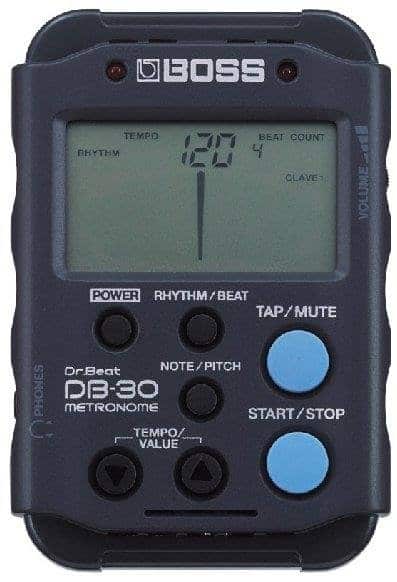
Buy or download a metronome
The biggest downside of online lessons is that, due to time lag, it is almost impossible to play together online in any meaningful way. Because of this, there is a greater emphasis on the use of metronomens and / or backing tracks in lessons so that students can continue to work on their timing and ensemble skills.
As with tuners, metronomes may be obtained either as an app or a physical unit. Google even has its own metronome if you simply type “metronome” into Google. CLICK HERE to see the Google metronome. It is also possible to buy 2-in-1 metronomes and tuners too. If you choose to use an app, ideally this will be on a different device to what you are using for your camera as otherwise toggling between programmes can be tricky and time consuming.
The price for metronomes varies in line with functionality. For all but advanced players, metronomes over £15 really aren’t necessary as most of the time only a simple click will be required. If you’d prefer to buy a physical unit, something like this metronome from Korg will do the job. We would strongly advise against wind-up style metronomes. They look lovely but massively inferior to their digital counterparts in several areas.
Have your backing tracks ready
Having your backing tracks ready will save A LOT of lesson time. This may be tracks for the RSL exams, or even a link to a YouTube backing track. As with the metronome, this should be on a different device to what you are using for your camera to give greater control and save time moving between programmes.
Make sure your music is to hand
As above, this will save a lot of time looking for music in the lessons or toggling between different programmes on your computer. Call me old fashioned but sometimes you can’t beat good ol’ paper! This goes for plectrums, capos or any other item or accessory that you may need for your lesson
Think about where your phone / webcam will go in advance of the lesson and get everything ready
To give you accurate and useful feedback, your tutor will need to be able to see your instrument. Before the lesson, check that you and your computer, webcam or phone are in an appropriate position. If you are using a mobile, we can’t recommend a tripod highly enough as this will enable you to get the right angle in seconds. We have experience a lot of wasted time from students trying to get a shot with some well positioned books. Of course, if (and usually when!) the phone gets knocked over, the whole process starts again. I have this table-top tripod from Benro and it works really well. Depending on what you go for, you may also need to buy an additional attachment for your mobile. For guitar lessons, place your mobile in a landscape position so that your tutor can see as much of your guitar as possible. Don’t forget to make sure auto-rotate is enabled on your phone.
Try not to sit in front of a window. Having large light sources behind you may result in the tutor only being able to see your silhouette. However, lighting that points towards you will augment the image.


Invest in a music stand
If you do not already have one, a music stand will help you sit comfortably and allow you to position your music so that you can read it easily.
Set an alarm for 10 minutes before your lesson
As with most things in life, getting ready for your online guitar lesson can take longer than you think. By time you’ve set up, tuned up, got all your music out and positioned the camera, you may find that everything becomes a mad rush the start of the lesson draws ever nearer. We’d highly recommend you start getting ready at least 10 minutes before the lesson so that you are not getting ready in the lesson.

We hope you’ve found this article helpful.
If you’d like to know more about our online music lessons or guitar, bass guitar or ukulele lessons in or near Bushey and Watford, please get in touch.